Small Business Cybersecurity Checklist: 13 Essential Steps
These cyber security for small business recommendations focus on the conventional Small and Medium Enterprise organizations. This text does not cover startup specifics or the application security needs of software development companies. This is just a checklist of the most crucial cyber security measures every small business owner can and must implement.
This is how you can learn if these cybersecurity tips can be applied to your organization. If you have (1) a person responsible for cyber security full time and (2) a separate cyber security budget, most probably you have to show this to your CISO and check if anything from the list is missing. If you lack any of the two – this guide is just for you.
Download Free PDF Checklist
Get a printable version of this small business cyber security checklist to share with your team. Download the PDF checklist
What’s in This Guide
- Use password managers
- Use two-factor authentication
- Install security updates automatically
- Do backups and backups of backups
- Scan yourself regularly and reduce the attack surface
- Secure your network: cloud firewall and segmentation
- Check your configurations in the cloud and on the ground
- Centralize logging
- Detect and track unauthorized access
- Build a basic incident response plan
- Use basic endpoint security software
- Train your team to spot phishing and social engineering
- Hack yourself first
- Common cybersecurity misconceptions
- Frequently asked questions
Use password managers
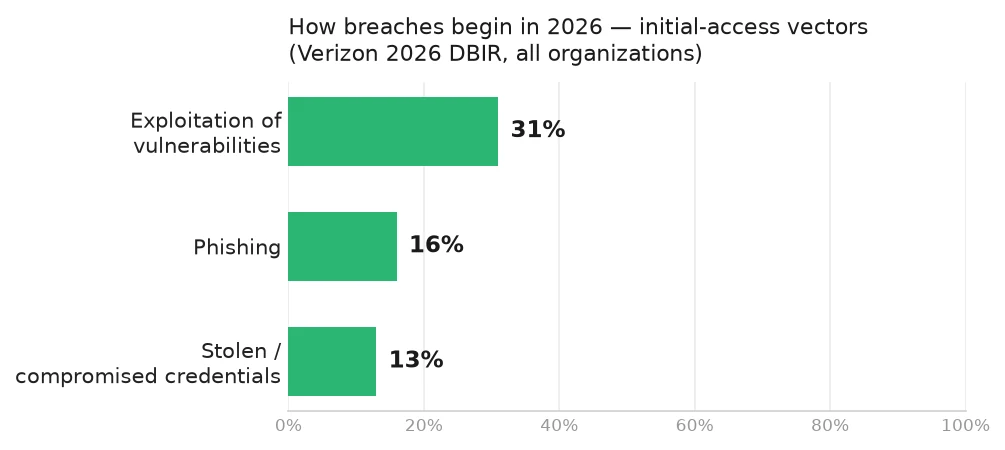
As long as we use passwords, hackers will attempt to crack them to gain access to valid user accounts. Verizon’s 2026 Data Breach Investigations Report, which examined roughly 22,000 confirmed breaches, shows that exploitation of vulnerabilities (31%) has overtaken stolen credentials as the most common way into a breach, with phishing (16%) and stolen or compromised credentials (13%) close behind. Credentials are no longer the single top vector they once were, but they remain pervasive – appearing in roughly 39% of breach chains overall. The report also delivers a hard message for smaller organizations: 96% of ransomware victims with a known company size are small and mid-sized businesses, and ransomware now appears in 48% of all breaches.
There are two ways to lower this risk: using unguessable passwords and adding a second authentication factor. Both are simple and easy; however, they require some time to get used to. Good news: after the transition is over, users spend less time to authenticate, as they must not type their passwords anymore: they will fill them in via the autotype function or accompanying browser extensions.
A password manager allows your employees to remember only two passwords – forever. One to enter their workplaces, such as a workstation or a laptop, and another to unlock the password safe in the password manager software, where all other passwords are securely stored.
Simplicity and high usability of password managers, together with the fact that the users won’t have to memorize passwords from now on, allows you to demand creating long, random passwords from your employees. And as a positive side effect, cyber security becomes an enabler of a more productive workplace.
- Password managers: 1Password, Bitwarden, Apple Passwords
Use two-factor authentication
Two-factor authentication is as easy to implement as password managers, but it has a powerful advantage: it can be technically enforced. Password managers allow users to extend and randomize their passwords, but they could still ignore the opportunity. Two-factor authentication, instead, can be configured to require users to present a temporary code or a physical token.
Virtually all modern applications accept some form of the second factor. The most primitive one is a temporary password sent in an SMS to a user-owned mobile phone. This one is the least secure and must be avoided. We recommend using mobile app-generated one-time passwords (OTP) for all user accounts in the organization and hardware tokens for users with high privileges or accounts in critical systems.
Looking ahead, passkeys are emerging as the passwordless future. Supported by Apple, Google, and Microsoft, passkeys use biometrics (fingerprint, face) instead of passwords. Many hardware keys like YubiKey already support passkeys. Consider adopting them as your vendors enable support.
- Software-based 2FA: Google Authenticator, Authy, or the OTP functionality in your password manager of choice
- Hardware 2FA: YubiKey
- Learn about passkeys – the future of passwordless authentication
Install security updates automatically
Software with known vulnerabilities remains one of the most looming cybersecurity threats. Hackers rarely use yet unknown security bugs, also known as zero-days, to attack regular targets. Getting rid of known security weaknesses is easy as most modern applications have built-in automatic software updates.
It is true, once in a while, even the most prominent software vendors screw up their update cycles and release poorly tested patches that brick the systems or send them into infinite reboot cycles. But it is not an excuse to turn off automatic updates; it is the reason to test updates before deploying them across the organization, of course, if you have the time. And most importantly, it is the reason always to have backups; more about it next.
- Enable automatic updates in Windows and macOS
- Configure unattended upgrades in Linux
Do backups and backups of backups
Backups do not come first on our list, but they are the most important safeguard for your sensitive data. A full-stop cyber security event, such as a ransomware attack, can be devastating if you do not regularly backup your systems and data. In the case of compromise, your business mission will directly depend on the frequency and quality of your backup copies.
It is crucial to make backup copies at an independent facility, and the cloud could be the right choice for an SME. This approach is never free and is charged per storage used, number of users, number of machines, or a combination of the three.
If you can automate backups on your own – good for you, go for it. But no matter if you do it yourself or use a service provider, make sure you have multiple locations for backup copies, check and restore them regularly, and encrypt them before moving data to the cloud.
The most important thing about the backups that many companies get wrong is recovery tests. It is true: modern backup solutions rarely fail, but when they do, you are basically in a situation when your backups are screwed, and so is your business. Our advice is to restore regularly to verify the integrity of restored data and the functionality of restored systems and applications to ensure that you can trust your backup solution.
- Configure automatic backups in Windows, macOS, and Linux
- Master cloud backups to S3 buckets
- Take a look at IDrive, BackBlaze, and other solutions
Scan yourself regularly and reduce the attack surface
To protect your business, you must know how hackers can attack it. Hacking means exploiting systems and applications in a way that their creators and owners do not intend. Malicious hackers aim at harming you and your business. So, first of all, you always need to know what systems you have, where they are, and what services they run.
Many small companies get compromised via a very dumb attack vector: they access their systems remotely, so they open the related services, such as RDP, VNC, or SSH, to the internet. Hackers often guess passwords to these services by trying the top 100 popular ones found in prior password leaks. Then, they just use the compromised user’s account to get in, encrypt all the data, and demand ransom.
Enabling strong authentication, enforcing random passwords, and using 2FA prevent that, but if the service has known security bugs, it doesn’t matter. Hiding behind a firewall and automatically installing security patches reduces the risk. However, there is still a possibility you could get hacked, and you can eliminate it by removing potentially vulnerable unused services. Yes, you may not even know they exist, and removing them would not affect you at all.
The question is, how can you find them? This one is easy: regularly run discovery scans to maintain an inventory of your “assessment scope,” as we call it. Then run network scans to learn what services are enabled on your hosts and search for known security flaws in them. Not manually, of course; there are tools for that.
When you find a vulnerable service and think you need it, update it to the latest secure version. But even if the service is “clean,” ask yourself: do you need it exposed on the internet? If not, shut it down and disable it, or close network access to it on the firewall.
Want a professional assessment of your attack surface? BSG’s vulnerability assessment service can identify security gaps you might miss with automated tools alone.
- Use runZero for network asset discovery and inventory
- Run NMap (command-line) or Nmap.me (web-based) to scan your network hosts for open ports and known vulnerabilities
- Use Nuclei or Nessus to do regular vulnerability scans
Hide your websites behind a cloud firewall
A firewall is a well-known concept: put a device at the border of your network to segregate between the trusted internal private network and untrusted external public internet. A firewall is an excellent place to apply your network security policy, e.g., who can access what. It could also be intelligent enough to defend your organization from common attacks at the network perimeter.
In the modern world, though, the concept of the perimeter is out of date. More and more organizations eliminate the “internal vs. external network” mentality and apply the protection “at the edges” regardless of where the connection is coming from.
The easiest way to protect all your web servers from common attacks is to use Cloudflare edge protection. Cloudflare is a service that puts a combination of a Web Application Firewall and an anti-DDoS solution in front of your web service and takes the first hit whenever someone tries to attack you.
To use Cloudflare, you first have to migrate your DNS record to its facilities, which is as easy as copying and pasting. If you still feel not confident enough, there are guides on doing it safely and without service interruptions.
Next, you will need to configure the Cloudflare parameters to the level of security you want to get. Good news: all crucial functions, such as DDoS protection, basic WAF, and SSL enforcement, are available for free.
Finally, you will need to configure the hosts you have put behind Cloudflare to allow network connections only from Cloudflare itself. This way, no one will be able to attack you directly by circumventing the protection. It is simple as configuring a cron job on the Linux server; see below the link to a tool that does just that.
Warning! Make sure that you do not lose remote access, or else you will need to waste time restoring it. Good news: since recently, Cloudflare has allowed configuring SSH access to your hosts under its protection without a need to expose SSH ports publicly.
- Try out Cloudflare
- Limit network access to Cloudflare networks
- Configure stealth remote access via SSH
Small business network security: segment your office and on-premise network
A complete small business network security checklist does not stop at what you publish to the internet. Most small businesses still run an office network – workstations, printers, a NAS, smart TVs, the receptionist’s laptop, and a growing pile of IoT gadgets. Left flat, that network lets a single compromised device reach everything else. A few simple segmentation steps contain the blast radius:
- Make the router deny by default. Start from a posture where nothing talks to anything unless you explicitly allow it, then open only the flows your business actually needs (for example, workstations reaching the file server, but not the guest Wi-Fi reaching either). Most business-grade routers and firewalls support this with basic firewall rules.
- Run a separate guest and IoT Wi-Fi. Visitors, personal phones, and consumer IoT devices (cameras, thermostats, smart speakers) should sit on their own SSID with no route to your business systems. Client isolation keeps those devices from seeing each other, too. This single change removes a huge class of lateral-movement opportunities at almost no cost.
- Use basic VLAN segmentation. If your switch and router support VLANs, put workstations, servers, voice/VoIP, and IoT on separate VLANs and control traffic between them at the router. You don’t need an enterprise design – three or four zones (trusted, guest, IoT, servers) already make an intruder’s life far harder.
Network segmentation will not stop an attacker who phishes a valid login, but it sharply limits how far that one foothold can spread – which is exactly what turns a contained incident into a catastrophic one when it’s missing.
Check your configurations in the cloud and on the ground
Security configuration errors are another reason many companies get hacked: people make mistakes, and system administrators are people. According to the OWASP Top 10 project, security misconfiguration is the second most significant application risk (A02 in the OWASP Top 10:2025 release candidate). Good news: software vendors and cloud service providers share recommendations on how you can harden your systems and apps. Even better news: audits of these security settings can be easily automated.
If you have a Microsoft Active Directory managed on-the-ground IT infrastructure, the best security health check would be running Ping Castle and fixing its findings. You don’t even need high domain privileges; however, running it with elevated permissions would produce more results. Read its recommendations carefully, apply them with caution, and in a few days, your domain will become closed for ordinary attacks.
Suppose you have a lot or all of your systems in the cloud, Scout Suite for the rescue. You can view it as Ping Castle for cloud environments, but it is strongly biased towards AWS. It still produces valuable results for GCP and Azure, but AWS is where it shines. Run it regularly, eliminate its findings, and your cloud infrastructure will become more secure after each iteration. If your business depends heavily on a public cloud, it is worth understanding how a deeper review works – our guide to cloud penetration testing across AWS, Azure, and GCP explains what automated config audits miss and where manual testing adds value.
- Use Ping Castle in an AD environment
- Use Scout Suite in the cloud
- Prowler is another cloud security audit tool
Centralize logging
When a security incident requires investigation, logs are critical. A security incident may mean different things: from unauthorized individuals attempting to connect to the Wi-Fi access point to a full-scale organization compromise, data breach, or ransomware attack. In any case, without logs, you are blind to what has exactly happened and cannot learn how to prevent it in the future.
One critical thing about the logs: same as backups, they must be stored somewhere far from the regular systems and applications. A catastrophic event must not render them unusable, and malicious hackers must not be able to remove the traces of their presence. Another important thing: logs must be stored centrally to correlate the events in different systems to make sense of what is going on in the organization. And, of course, logs must be reliably backed up.
When your logs are collected and stored, you can start analyzing them regularly or even in real-time. Configure alerts to be notified about a possible security incident on time. However, proceed with caution as it might be overkill for a small organization. A viable alternative would be configuring canary tokens as described in the next section.
- Try Loggly – a SaaS log management solution
- Learn about logging in AWS
- Take a look at Elastic Security, and Wazuh
Detect and track unauthorized access
One of the most common questions small business owners ask is: how would I know if hackers got into my systems? The truth is, most breaches go undetected for months. According to IBM’s 2025 Cost of a Data Breach Report, the average time to identify a breach is 158 days, and 241 days including containment. For small businesses without dedicated security teams, it can be even longer.
Here are the warning signs that might indicate unauthorized access to your systems:
- Failed login attempts – Multiple failed logins, especially from unusual locations or at odd hours, could indicate password guessing attacks
- Unusual account activity – Logins at 3 AM, access from foreign countries where you have no employees, or multiple simultaneous sessions from different locations
- New user accounts – Accounts you didn’t create, especially with administrative privileges
- Unexpected system changes – Modified firewall rules, disabled security software, or new scheduled tasks
- Slow or unresponsive systems – Could indicate cryptomining malware or data exfiltration in progress
Set up tripwires with canary tokens
The concept behind canaries is simple: hackers do certain things during cyberattacks, and you can get alerts if these things are done to your systems. Canary tokens stem from the ancient art of network “honey pots” and are an example of what is now called cyber deception technologies. SMEs can use some canary tokens for free.
Canaries are pieces of data, such as folders, documents, or API tokens, that attract hackers’ attention. Say, a passwords.xlsx spreadsheet on a file server or a false password hardcoded into your application source code. Creating canaries and spreading them throughout your infrastructure is an artistic work, but do not get carried away: too many canaries will generate a lot of noise in the company’s normal operations.
Basic log analysis for suspicious activity
Even without a full SIEM solution, you can monitor for suspicious patterns:
- Review Windows Event Viewer or Linux auth logs weekly for failed login patterns
- Check firewall logs for repeated connection attempts from the same IP addresses
- Monitor cloud console access logs (AWS CloudTrail, Azure Activity Log, GCP Audit Logs)
- Set up email alerts in your cloud provider for sensitive operations like IAM changes
When to call in professionals
If you notice any of the warning signs above, take them seriously and act early rather than waiting to be certain. Consider engaging a professional incident response team if you see:
- Confirmed unauthorized access to sensitive data
- Ransomware notes or encrypted files
- Customer data potentially exposed
- Evidence of data exfiltration
A professional incident response can help contain the breach, preserve evidence, and guide you through recovery. If you suspect an active breach, BSG’s cybersecurity consulting team can help you contain it and plan recovery – early response limits damage.
- Try Open Canary or Canary Tokens
- Look at Thinkst Canary if you seek service and support
Build a basic incident response plan
Detection only matters if you know what to do the moment something trips. Most small businesses discover, in the middle of an actual incident, that nobody is sure who decides to pull a server offline, who calls the bank, or where the cyber-insurance policy number lives. The fix is a short, written incident response plan – not a fifty-page binder, just a one- or two-page document that anyone on the team can follow under stress. This is the part of cyber security that small businesses most often skip, and it is also the cheapest to fix. For a step-by-step walkthrough, see our dedicated guide to a cyber incident response plan for small business, which adapts a battle-tested public-sector playbook; the summary below covers the essentials.
Define roles and responsibilities
Write down who does what before you need it. For a small organization, a handful of named roles is enough:
- Incident lead – the one person who can declare an incident and make the call to disconnect systems or shut services down. Name a backup in case they’re unreachable.
- Technical responder – whoever administers your systems (in-house IT or your managed service provider) and can actually isolate machines and pull logs.
- Communications owner – decides what you tell customers, staff, and partners, and when.
- External contacts – your IT provider, your cyber-insurance carrier, your legal advisor, and a security firm you can call. Agree on these before an incident, not during one.
Keep an emergency contact list
Store an offline copy – printed and/or on a phone – of every number you’d need if your network and email were down or untrusted: the incident lead and backup, your IT provider’s emergency line, your bank’s fraud desk, your insurer’s breach hotline, key vendors, and law-enforcement reporting channels for your country. If ransomware locks your file server, you do not want your only copy of these contacts sitting on that file server.
Know the basic containment steps
When something is clearly wrong, the first moves are almost always the same:
- Isolate – disconnect the affected machine from the network (unplug the cable, disable Wi-Fi), but do not power it off if you can avoid it – shutting down can destroy volatile evidence.
- Preserve – leave logs, files, and disk images intact; resist the urge to “clean up” or reinstall before someone has captured what happened.
- Notify – alert the incident lead, then work down the contact list: IT provider, insurer, and, where the law requires it, regulators and affected customers.
Run a simple tabletop drill
A plan you’ve never rehearsed tends to fail on first contact. Once or twice a year, gather the people named above for thirty minutes and talk through one realistic scenario – “an employee reports their laptop is encrypted and showing a ransom note” – step by step. Who gets called first? Who isolates the machine? What do we tell customers? These tabletop drills surface the gaps (a missing contact, an unclear decision-maker) while the stakes are zero, and they cost nothing but a meeting room.
Use basic endpoint security software
Let us not forget about the essential protection of the employees’ workstations and laptops, where the actual work is happening. A built-in firewall must be enabled on all computers, and basic antivirus software should be set to real-time protection and daily full scans.
Besides that, security configuration settings must be regularly checked, and OS Query is an excellent open-source project that allows you to collect this data from remote computers using SQL-style queries. If you don’t have time to figure it out yourself, give Kolide a chance: it is a successful attempt to provide OS Query as SaaS.
- Enable Microsoft Defender on Windows
- Use Pareto Security on macOS for security configuration checks
- Learn about OS Query or try out Kolide
Train your team to spot phishing and social engineering
Security awareness is the control that ties this whole checklist together: every technical safeguard above can be undone by one employee clicking the wrong link or wiring money to a convincing fake. Attackers know this, which is why phishing and social engineering remain the easiest way into most small businesses: it is far cheaper to trick a person than to break a patched system. Your people are not the weakest link – they are a control you can actually strengthen, and unlike most security spending, awareness costs very little. It starts on day one (see onboarding below) and never really ends.
Cover the security-awareness basics
Make sure everyone understands the handful of attacks that account for most incidents: phishing emails that impersonate a vendor or boss, fake login pages that harvest credentials, “urgent” payment or gift-card requests (business email compromise), and pretext phone calls or texts pretending to be IT support or a supplier. Teach two reflexes above all: verify unexpected money or credential requests through a second, known channel (call the person on a number you already have), and treat urgency itself as a warning sign rather than a reason to comply.
Run phishing simulations
You can’t measure awareness from a slide deck. Periodic phishing simulations – controlled fake phishing emails sent to your own staff – show you who clicks, who reports, and whether training is actually landing. Keep them realistic but fair, repeat them a few times a year, and watch the report rate climb over time. The goal is not to catch and shame people; it is to build a workforce that recognizes and reports the real thing.
Build a no-blame reporting culture
The single most valuable behavior you can cultivate is fast reporting. An employee who clicks a bad link and tells you within minutes gives you a fighting chance to contain it; one who hides the mistake for a day out of fear hands the attacker that day for free. Make reporting effortless (a single “report phishing” button or a known address), thank people for reporting even false alarms, and never punish someone for clicking. Blame guarantees silence, and silence is what attackers count on.
Don’t forget onboarding and offboarding hygiene
Security awareness is a lifecycle, not a one-off. Bake security into employee onboarding so new hires learn your reporting process and core habits in week one, before they’ve developed bad ones. Just as important, offboarding: when someone leaves, promptly disable their accounts, revoke access tokens and VPN credentials, reclaim hardware, and rotate any shared passwords they knew. Dormant accounts of former employees are a favorite foothold for attackers and a classic finding in our penetration testing engagements.
Hack yourself first
Our recommendations would be incomplete without how BSG as a company could protect you from cyber threats. The two affordable ways to benefit from good relations with hackers available to virtually every company are penetration testing and bug bounties.
Pentesting is a controlled simulation of a realistic cyber attack on your organization. It may involve network- and application-level attacks, as well as social engineering probes of your employees’ cyber security awareness. Pentests are conducted by qualified experts from respectful companies in the cyber security industry, and pentesting services are delivered according to B2B contracts. Not all providers are equal, though – if you’re evaluating vendors, our guide on how to choose a penetration testing company walks through the questions that separate a real assessment from a glorified vulnerability scan.
On the other hand, a bug bounty program is an organization’s public announcement that it welcomes hackers to assess its security, report findings, and get rewarded. Different ways to organize bug bounty programs exist, from as large as an in-house operation in huge software product companies to as small as just a properly formed security.txt file with your security contacts on the main company website.
Pentesting and bug bounties do not replace but rather complement each other. They may look similar, but in reality, the only thing in common is hackers involved.
- Configure a security.txt tile on your main website
- Learn about managed bug bounties on HackerOne and BugCrowd
- Consider the BSG penetration testing services
7 Common Cybersecurity Misconceptions in Small Businesses
Despite the increased focus on securing the business, discussions about some cybersecurity topics occur, as many are still controversial. These myths can lead small businesses to make dangerous decisions about securing their data, leaving them open to attack. To deal with these common misconceptions, it is essential to know them first.
Myth 1: My business is too small to be a target
No one cares about how large or how small your business is. Attackers hack you first and think about how to monetize it later. Many loud modern hacks started with small companies which were providing services to some larger organizations. According to Verizon’s 2026 DBIR, 96% of ransomware victims with a known company size are small and mid-sized businesses – proving that size doesn’t protect you.
Myth 2: Antivirus software keeps me completely safe
Antivirus isn’t a silver bullet, just like firewalls, DLP, endpoint protection, or any other single technology hyped throughout computer security history. Even if you own all these technologies, this doesn’t mean you can’t be hacked. As a great quote from the hacking history book “The Cult of the Dead Cow” goes: “Antivirus is better than nothing.”
Myth 3: Cloud services are inherently secure (or insecure)
Both statements are incorrect. Every business must understand a shared responsibility model in the cloud. You are responsible for the security “in the cloud,” while a good cloud provider is responsible for the security “of the cloud.”
Myth 4: Cybersecurity is too expensive for small businesses
It’s simply false. If you do small business, your stakes are relatively low, as is your cybersecurity investment. If you grow your business, your stakes go higher as a cybersecurity investment does. Many essential tools in this guide – password managers, 2FA apps, Cloudflare’s free tier, built-in endpoint protection – cost nothing or under $10/user/month. The effectiveness of your security spending is a matter of both what you do and how you do it.
Myth 5: IT department is responsible for all cybersecurity
It’s false. Understanding cybersecurity is essential for modern IT professionals and business units. Business leaders should remember that all their employees are responsible for the safety of a business. Building cybersecurity awareness among employees and business leaders should be your goal. Security is everyone’s responsibility – from the CEO to the newest hire.
Myth 6: Strong passwords are enough protection
Credentials still turn up across roughly 39% of breach chains (Verizon 2026 DBIR), so passwords alone aren’t sufficient. This is why we recommend password managers plus two-factor authentication. Even the strongest password can be phished, keylogged, or exposed in a data breach. Multi-factor authentication stops the large majority of credential-replay and password-reuse attacks even when passwords are compromised.
Myth 7: Compliance equals security
Meeting compliance requirements (PCI-DSS, GDPR, HIPAA) is important, but it’s not the same as being secure. Compliance is a baseline – it tells you the minimum you must do, not the optimal security posture. Many breached organizations were “compliant” at the time of the incident. Use compliance as your starting point, not your finish line.
Frequently Asked Questions
What is the most important cybersecurity measure for small business?
If you can only implement one measure, choose multi-factor authentication (MFA) across all business accounts. According to Verizon’s 2026 DBIR, credentials remain pervasive – appearing in roughly 39% of breach chains – and 96% of ransomware victims with a known size are small and mid-sized businesses. MFA stops the large majority of credential-replay and password-reuse attacks even if passwords are compromised. Start with email and cloud services, then expand to all business applications.
How much should a small business spend on cybersecurity?
Industry benchmarks suggest 5-10% of your IT budget should go toward security. For small businesses, this often means $500-$5,000 annually for basic protections. However, many essential tools in this checklist – password managers, 2FA apps, Cloudflare’s free tier, and built-in endpoint protection – cost nothing or under $10/user/month. Start with free tools and invest as you grow. When you’re ready to budget for a professional assessment, our breakdown of what you can expect to pay for penetration testing explains the cost drivers so you can plan realistically rather than guess.
How do I know if my business has been hacked?
Warning signs include: unusual failed login attempts, unexpected account activity (strange hours, foreign locations), new user accounts you didn’t create, disabled security software, ransomware notes, or unexplained system slowdowns. Set up canary tokens as described above to get alerts when attackers access sensitive files. If you suspect a breach, contact a security professional immediately.
Do small businesses need a firewall?
Yes, but not necessarily expensive hardware. For websites and web applications, a cloud-based WAF like Cloudflare (free tier available) provides excellent protection. For office networks, your router’s built-in firewall plus endpoint firewalls (Windows Defender, macOS firewall) cover most small business needs, especially when paired with a separate guest/IoT Wi-Fi and basic network segmentation. Hardware firewalls make sense when you have on-premise servers or strict compliance requirements.
How often should small businesses update their cybersecurity?
Enable automatic updates for all software – this is non-negotiable. Beyond updates, review your security posture quarterly: check password manager adoption, verify 2FA is enabled on all accounts, run vulnerability scans, test backup restoration, and review access permissions for departing employees. Annual penetration testing is recommended once you’ve implemented the basics.
Conclusion and next steps
I hope this information proves valuable to your business organization. There are other ways to improve your security, but this is the absolute minimum of what is needed in every company. What could be the following steps, though?
Once you have completed the above checklist and want to dedicate time and resources to progress forward, we recommend focusing on these activities.
- Establish a privacy-centric culture in the company. Encourage everyone to use a reputable personal VPN service such as Mullvad, ProtonVPN, or IVPN. This will improve privacy on public networks and when traveling. For office networks, consider a business VPN solution that integrates with your existing infrastructure.
- For macOS users, there are many free or affordable juicy security nuggets out there. Little Snitch and other tools from its family of products is a fantastic way to control where your client-side applications connect to and decide whether they should have this ability. Objective See is another source of macOS security tools, and we use most of them ourselves.
- Once ready, try to put everything into a system. We are not talking about a formal Information Security Management System as in ISO/IEC 27001 standard, although you may get there one day too. We are thinking more about some basic methodology or framework that maps to a well-established set of standards. Once these questions start popping up in your head, get in touch, and we will figure out together what next.
BSG's cybersecurity consulting helps small and mid-sized teams turn baseline hygiene into a real security program — practical roadmap, no enterprise overhead, sized to your business.
Request a quote →